Templates Pricing
🇺🇸 English
🇪🇸 Español
🇫🇷 Français
🇩🇪 Deutsch
🇷🇺 Русский
🇹🇷 Türkçe
🇦🇿 Azərbaycan
🇨🇳 中文
🇸🇦 العربية
🇻🇳 Tiếng Việt
🇮🇹 Italiano
🇵🇹 Português
🇳🇱 Nederlands
🇷🇴 Română
🇬🇷 Ελληνικά
🇵🇱 Polski
🇮🇩 Bahasa Indonesia
🇸🇪 Svenska
🇯🇵 日本語
🇮🇱 עברית
🇰🇿 Қазақша
🇺🇿 Oʻzbekcha
Get Started

How to Translate Your CV into Another Language

Upload the CV you already have, tell MyEasyCV which language you need and anything it should keep in mind, and you get a translated CV in a clean, editable design. This guide walks through every screen, then shows three worked examples: German → English, Portuguese → English and English → Spanish.

Open the CV translator

Free account · first CV free to create and preview · PDF, DOC, DOCX or TXT

In short: open the CV translator, upload your CV (PDF, DOC, DOCX or TXT, up to 5 pages), write any instructions in Additional Notes, choose the CV language you need, pick a design and click Generate My CV. Check the result in the preview, fix anything in the editor and download the PDF. The CV stays in your dashboard, so you can come back and edit it later.

Last updated: · MyEasyCV

Watch: MyEasyCV in 20 seconds

The video gives a quick tour of the whole product: creating a CV, translating it, tailoring it to a job ad and editing it in your dashboard. The steps below focus on translation.

Before you start

  • Your current CV as a PDF, DOC, DOCX or TXT file, up to 5 pages. Image files such as JPG or PNG aren’t accepted. If your CV was made in Canva or Google Docs, download it as a PDF first.
  • A free MyEasyCV account. You’re asked to sign in or sign up before the CV is created, so the result is saved to your account.
  • The country you’re applying to. It decides more than the language: spelling, date style and which personal details belong on the CV.

How to translate your CV, step by step

The screenshots are from the live English site. The coloured numbers match the steps.

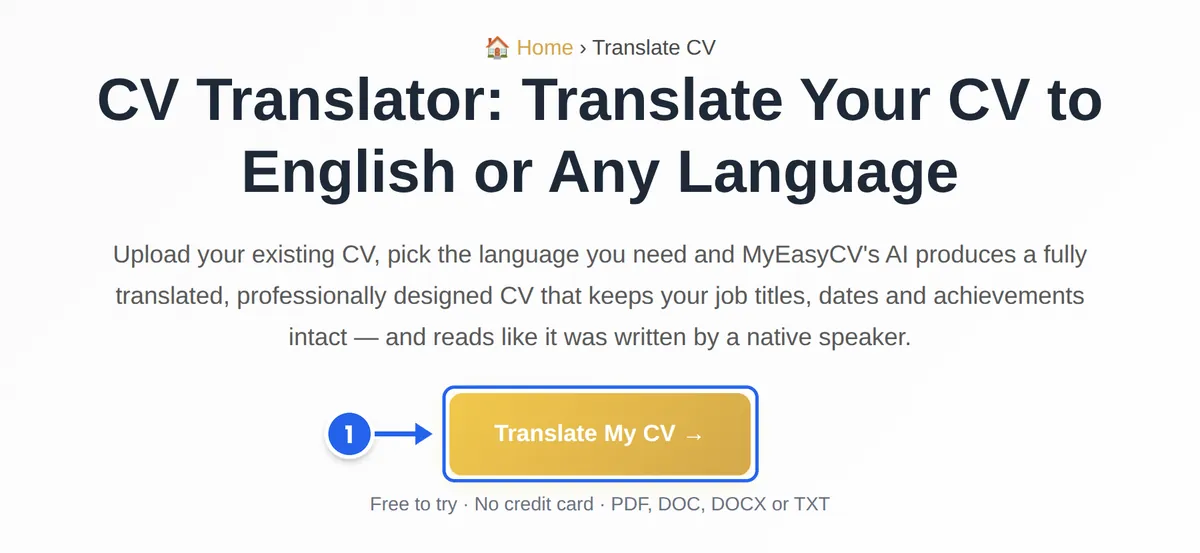
  1. Step 1: Open the CV translator

    Go to the CV translator and click Translate My CV. The CV builder opens in Update or Translate Your Old CV mode, ready for your file. If you aren’t signed in yet, MyEasyCV asks you to sign in or create a free account as soon as you try to upload.

    The MyEasyCV CV translator page with the Translate My CV button marked as step 1
    Step 1: the “Translate My CV” button on the CV translator page.
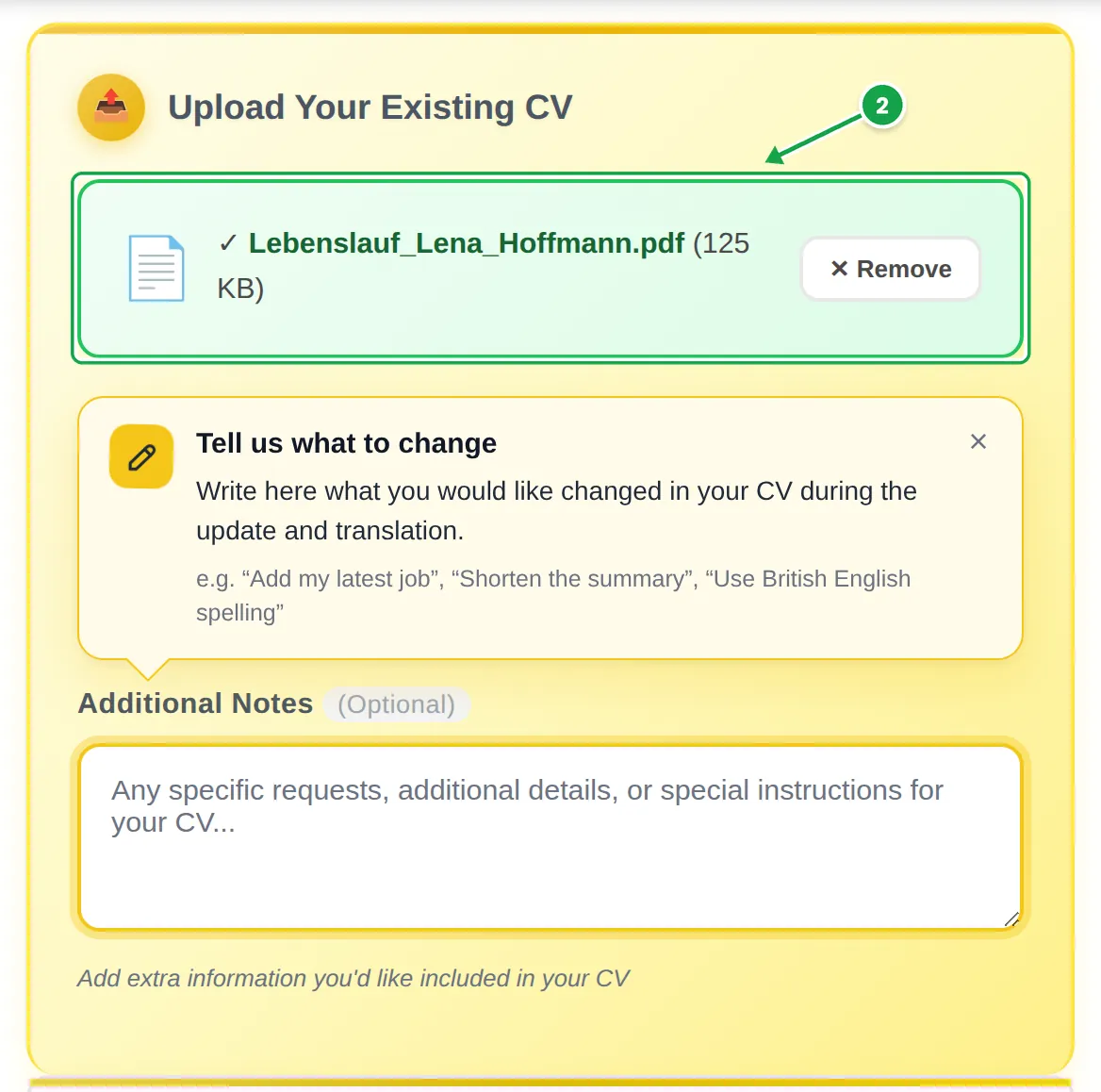
  2. Step 2: Upload your CV

    Click the upload area or drag your file onto it. A green box with the file name shows that the file is attached. The layout of your original doesn’t matter: the content is read and laid out again in the design you choose. Already have a CV in your MyEasyCV account? Use the My CVs button under the upload area to pick it instead of a file.

    Upload section of the MyEasyCV builder with the attached file Lebenslauf_Lena_Hoffmann.pdf marked as step 2, the “Tell us what to change” hint and the empty Additional Notes field
    Step 2: the attached CV file. The yellow card points you to the notes field for the next step.
  3. Step 3: Add notes for the translation (optional)

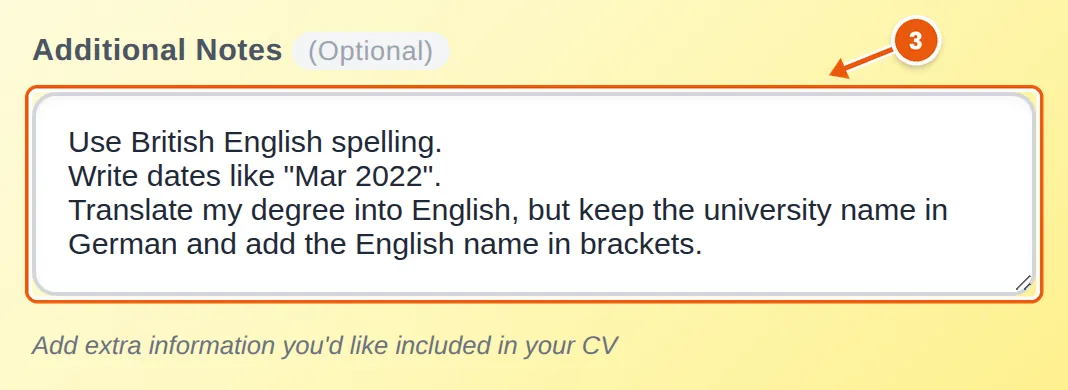
    Under the file you’ll find Additional Notes. Whatever you write here is sent to the AI together with your CV as special instructions, so this is where you say how it should be translated: British or American spelling, the date style, a term you want kept, a detail that’s missing. Write one instruction per line. Notes are optional, and you’ll find tips and examples in How to write good notes.

    Additional Notes field filled in with three instructions: use British English spelling, write dates like Mar 2022, keep the university name in German and add the English name in brackets
    Step 3: the notes used for the German → English example below.
  4. Step 4: Choose the language you want

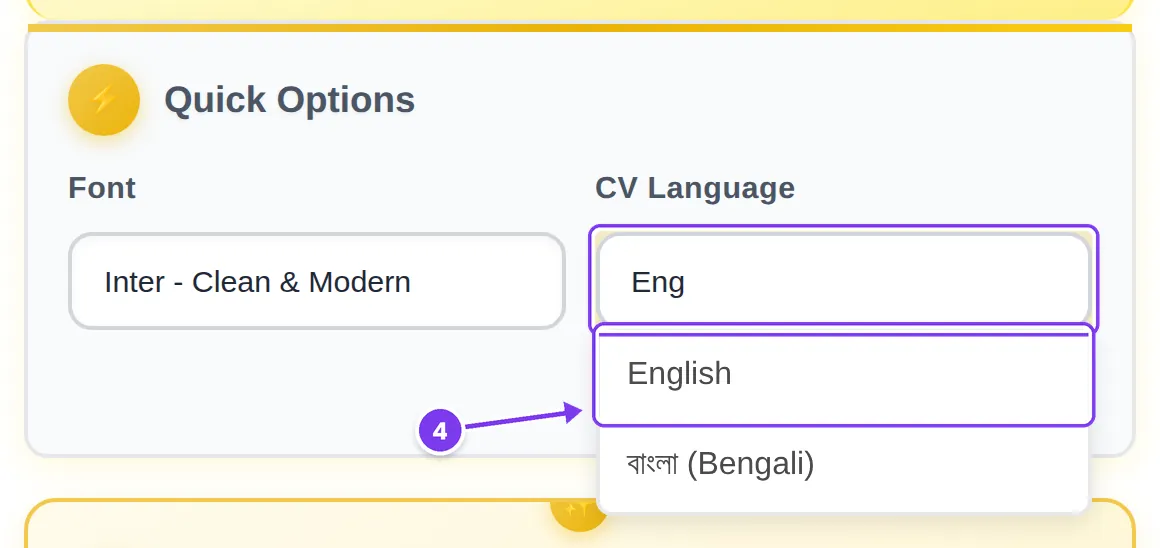
    In Quick Options, open CV Language and choose the language you need. Type a few letters to filter the list of more than 50 languages. When you start from the CV translator, this field is empty on purpose: if you click Generate without choosing, the language list opens for you.

    CV Language field with “Eng” typed and English at the top of the filtered list, marked as step 4
    Step 4: type to filter, then pick the target language.

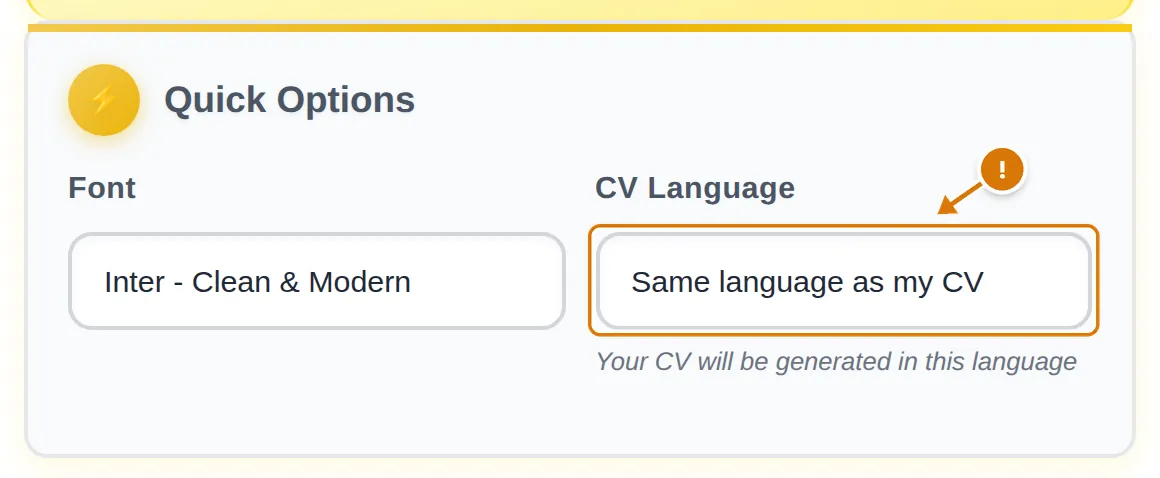
    Check the language before you click Generate. If you open the builder another way, for example from the menu, the field may already say Same language as my CV. That keeps your CV in its original language, rebuilt in the design you chose, without translating it. Every click on Generate creates a new CV and uses one CV generation (a free account includes one), so change the field to the language you need first.

    CV Language field set to “Same language as my CV”, marked with a warning sign
  5. Step 5: Pick a design and generate

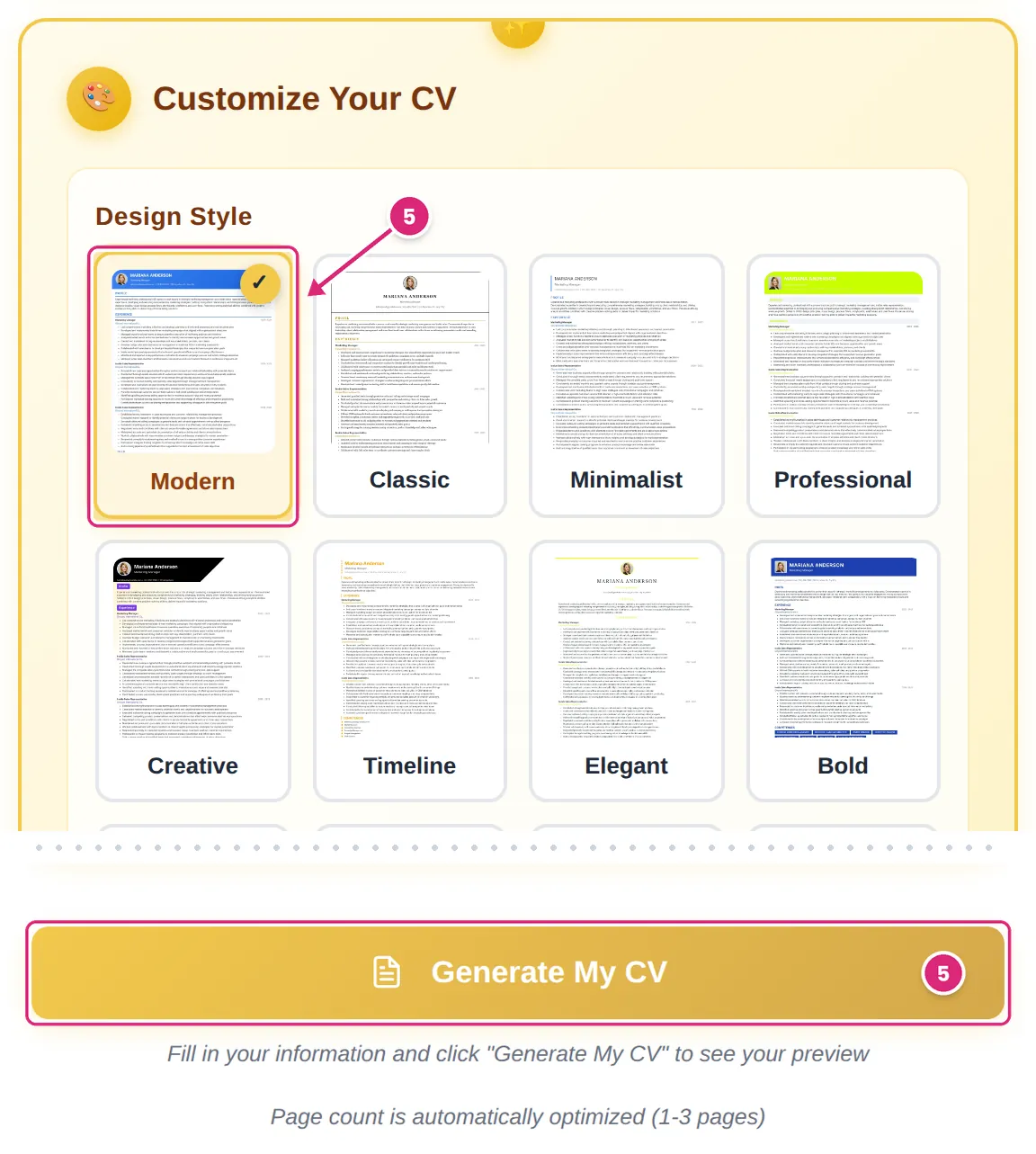
    Choose one of the 25 designs. The 11 single-column designs are the safest choice for applicant tracking systems (ATS). You can also set a font and an accent colour. Then click Generate My CV. For a typical two-page CV this usually takes about a minute, and the page count is set automatically (1–3 pages). The design is applied when the CV is created, so choose it before you click.

    Design Style grid with the Modern design selected and the Generate My CV button, both marked as step 5
    Step 5: pick a design, then click “Generate My CV”.
  6. Step 6: Check the preview and fix anything

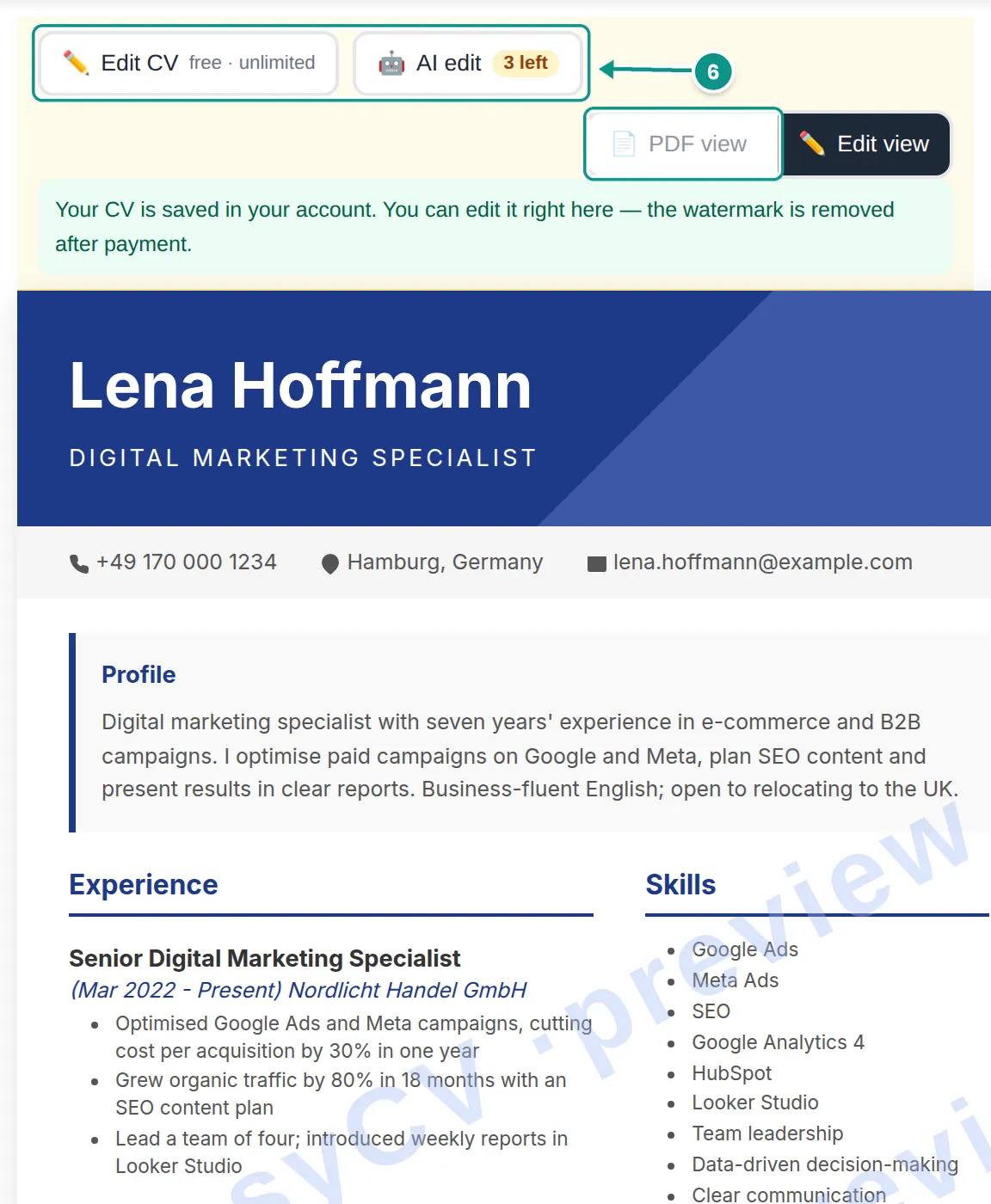
    Your translated CV appears in the preview with a “MyEasyCV · preview” watermark. Read it line by line. Click Edit CV to change any text yourself, including section headings (free and unlimited), or AI edit to describe a change in your own words (a free account includes 3 AI edits). PDF view shows the CV page by page, the way it will look as a PDF.

    Translated English CV in the MyEasyCV preview with the watermark and the Edit CV, AI edit and PDF view buttons marked as step 6
    Step 6: the result opens with the editing tools above it.
  7. Step 7: Download it, or come back later

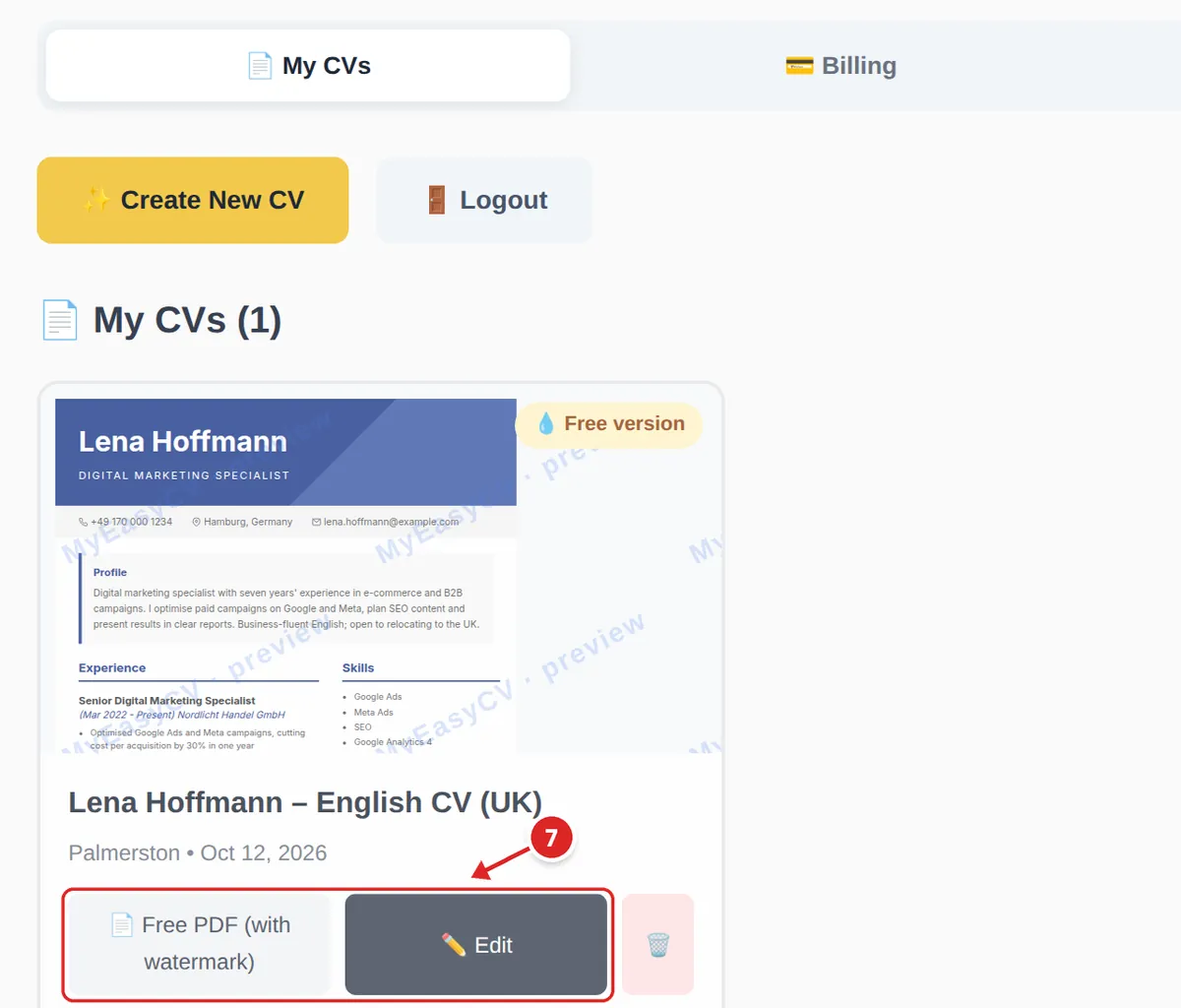
    Every CV you create is saved under My CVs in your dashboard. From there you can open the editor again with Edit, download a free PDF with a watermark, or remove the watermark with a paid package. The clean PDF needs the One-Time package or the Pro plan; prices depend on your country and are shown on the pricing page.

    Dashboard with the saved CV “Lena Hoffmann – English CV (UK)” and the Free PDF and Edit buttons marked as step 7
    Step 7: your CV in the dashboard, ready to edit or download.
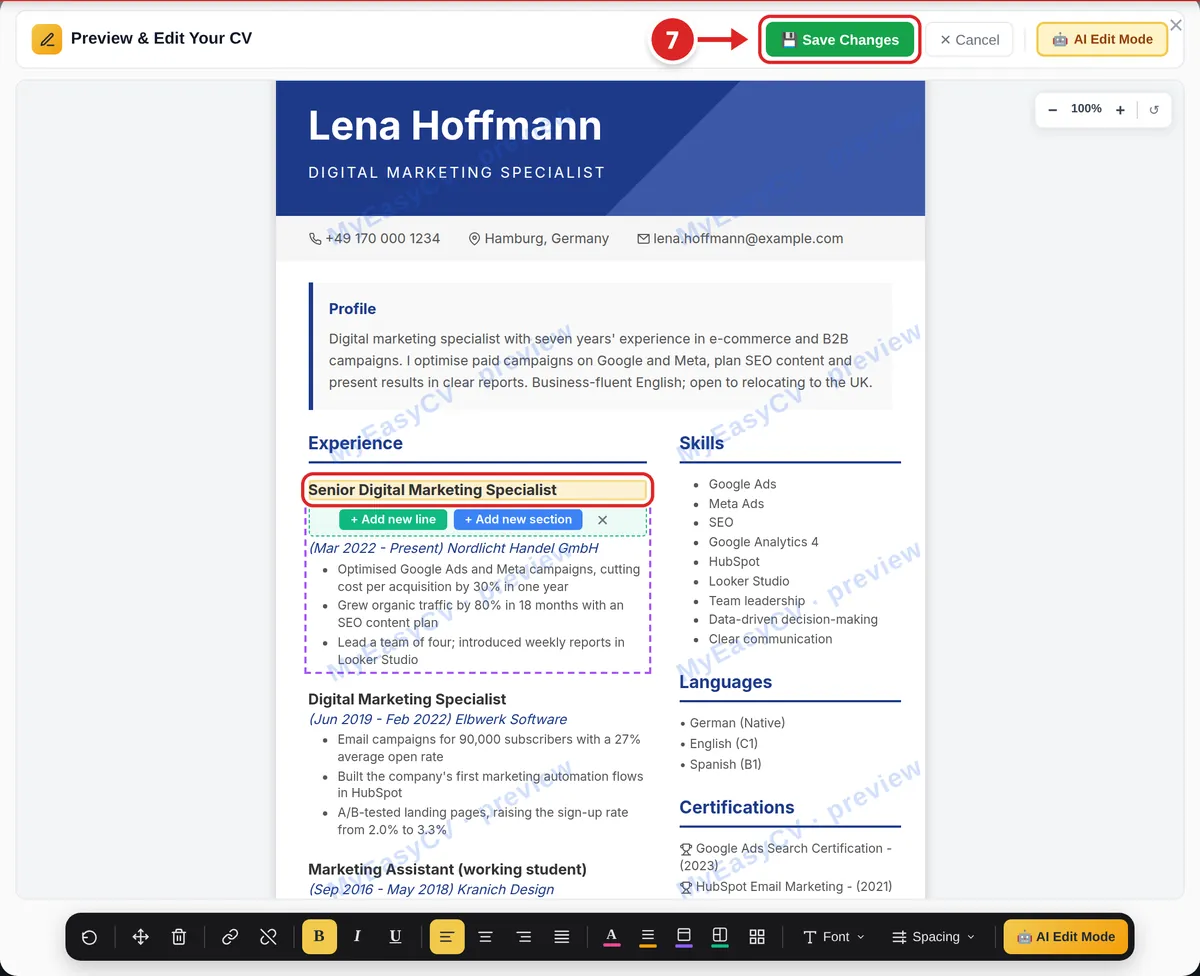
    The Preview & Edit Your CV window in the dashboard, with Save Changes marked and a job title selected for editing
    The dashboard editor: click a line to change it, then click “Save Changes”.

Worked examples

The three examples below use fictional people. Both versions of each CV are rendered with a real MyEasyCV design, but the translated side was written by hand to show what a good result looks like. Your own result depends on your CV and your notes, so always review it. The letters on the images match the rows of each table.

Example 1: German → English (UK)

Lena, a digital marketing specialist from Hamburg, is applying for jobs in the UK. Her CV is a classic German Lebenslauf, with a Persönliche Daten (personal details) section.

Additional Notes used

Use British English spelling.
Write dates like "Mar 2022".
Translate my degree into English, but keep the university name in German and add the English name in brackets.

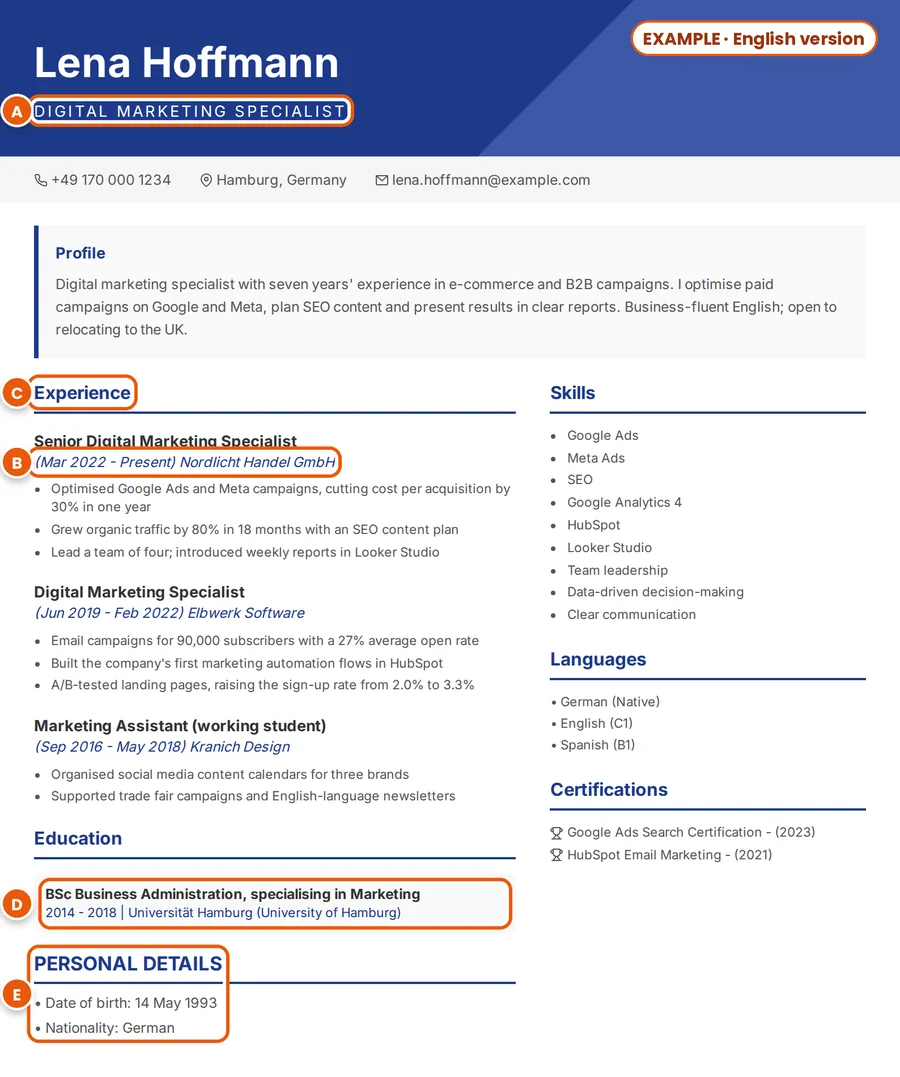
OriginalExample: fictional German CV of Lena Hoffmann, with the job title, dates, a section heading, the degree and the personal details marked A to E
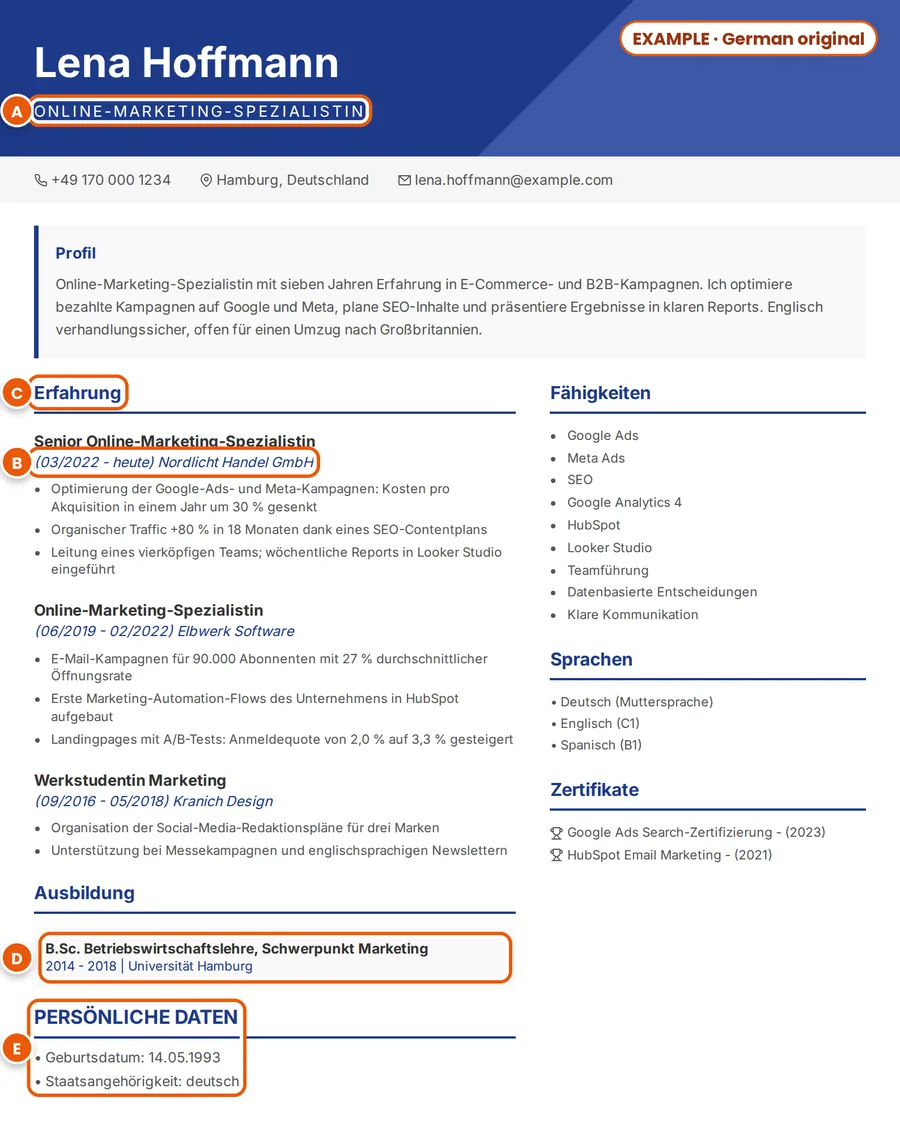
TranslatedExample: the same CV in English, with the translated job title, dates, heading, degree and personal details marked A to E
Example with a fictional CV: the German original (left) and an English version (right).
MarkGerman CVEnglish CVWhy
AOnline-Marketing-SpezialistinDigital Marketing SpecialistGerman job titles are often gendered (‑in for a woman). English titles aren’t, and “digital marketing” is the more common term in UK job ads.
B03/2022 – heuteMar 2022 – PresentHeute (today) becomes “Present”. The month style comes from the notes.
CErfahrung, AusbildungExperience, EducationSection headings come from the design, in the language of the CV.
DB.Sc. Betriebswirtschaftslehre, Schwerpunkt Marketing · Universität HamburgBSc Business Administration, specialising in Marketing · Universität Hamburg (University of Hamburg)The university name stays in German by default. The English name in brackets is there because the notes asked for it.
EPersönliche Daten: Geburtsdatum, StaatsangehörigkeitPersonal Details: Date of birth, NationalityTranslated, not removed. UK employers don’t expect a date of birth or nationality on a CV, so Lena deletes this section in the editor before downloading.

Other German CV terms and how they usually appear in English

Lebenslauf
CV (in the UK); a résumé in the US
Berufserfahrung
Work experience
Ausbildung, Studium
Education (an Ausbildung can also be a vocational training programme: say which)
Kenntnisse, Sprachkenntnisse
Skills, Languages
Werkstudentin / Werkstudent
Working student: a part-time job alongside a degree, e.g. “Marketing Assistant (working student)”
Muttersprache · verhandlungssicher
Native · business fluent
Abschlussnote 1,7
Keep the grade and explain the scale: “Final grade 1.7 (German scale, 1.0 is the best)”. Note the decimal point.

Read the same advice in German: Lebenslauf auf Englisch.
Example 2: Portuguese → English (US)

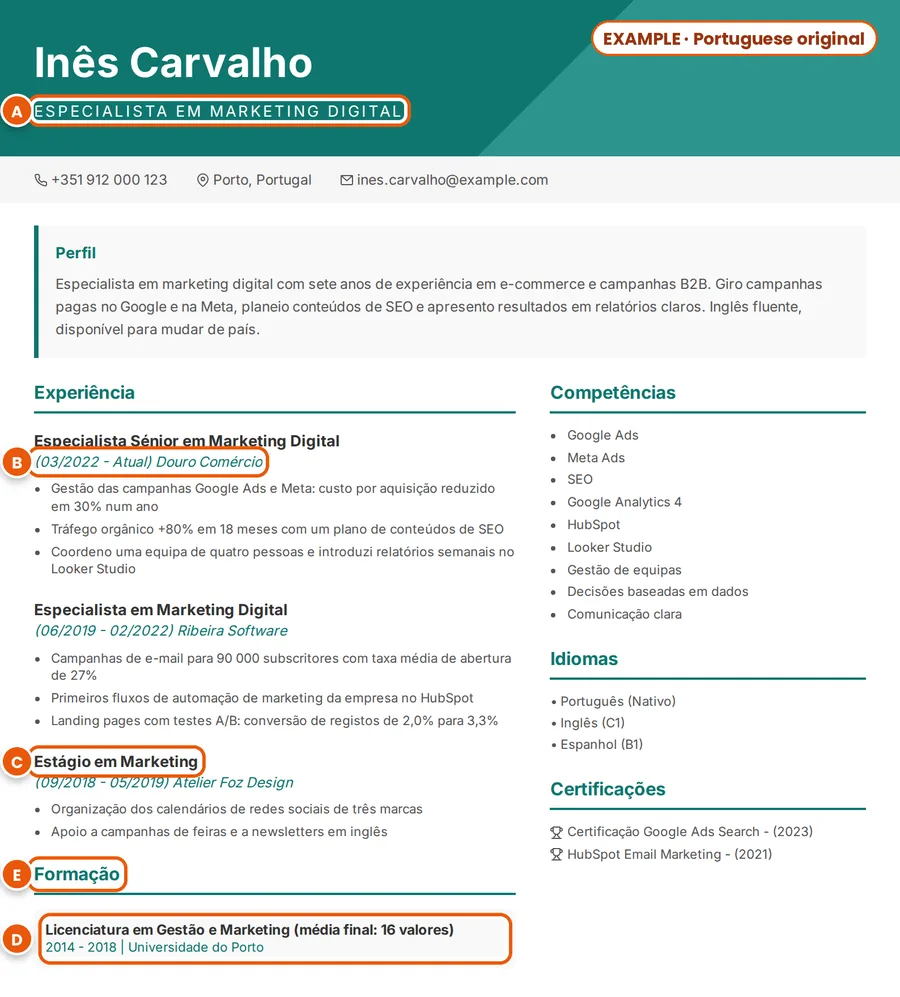
Inês, from Porto, is applying to a company in the United States. She wants American English and an honest description of her Portuguese degree and grade.

Additional Notes used

Use American English.
Translate "Licenciatura" as Bachelor's degree and keep the Portuguese term in brackets.
Show my final grade as 16/20. Don't convert it.

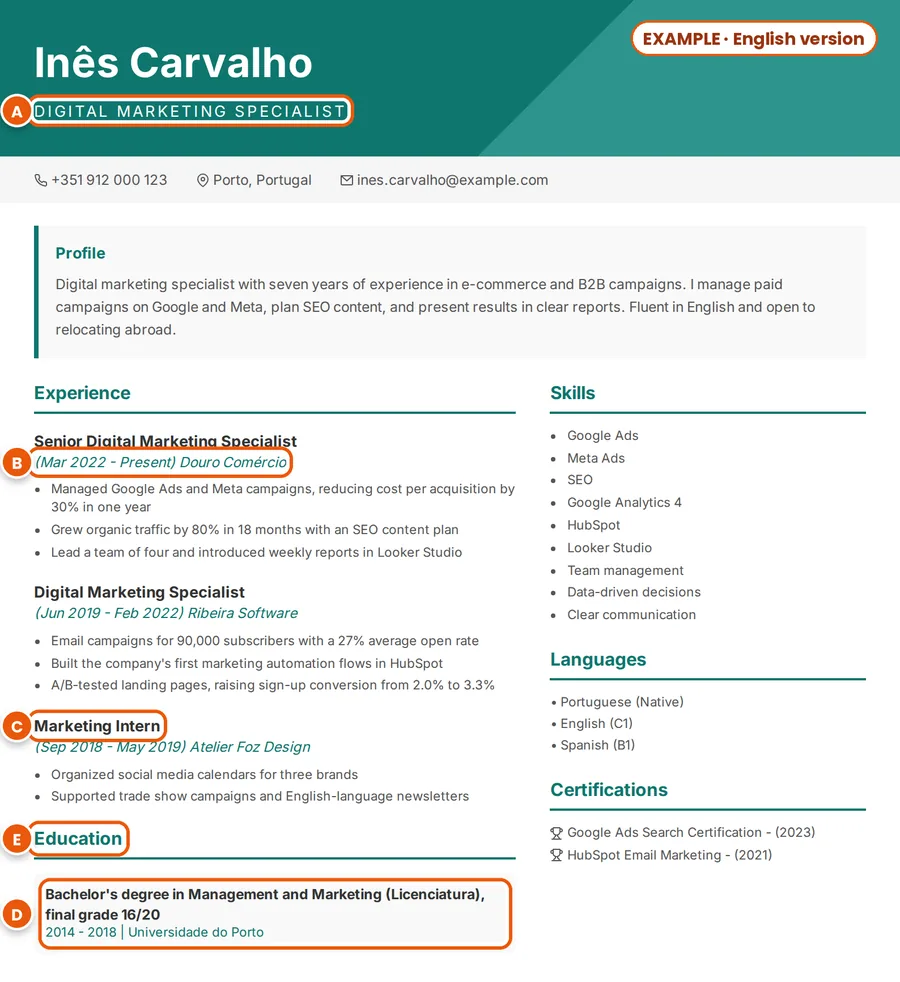
OriginalExample: fictional Portuguese CV of Inês Carvalho, with the job title, dates, an internship, a heading and the degree marked A to E
TranslatedExample: the same CV in American English, with the translated job title, dates, internship, heading and degree marked A to E
Example with a fictional CV: the Portuguese original (left) and an English version (right).
MarkPortuguese CVEnglish CVWhy
AEspecialista em Marketing DigitalDigital Marketing SpecialistThe word order flips in English. A senior role reads “Senior Digital Marketing Specialist”.
B03/2022 – AtualMar 2022 – PresentAtual means “current”, not “actual”. Months written as words also avoid confusion: 03/04 is 3 April in Portugal but March 4 in the US.
CEstágio em MarketingMarketing InternA false friend: an estágio is an internship, not a “stage”.
DLicenciatura em Gestão e Marketing (média final: 16 valores)Bachelor’s degree in Management and Marketing (Licenciatura), final grade 16/20The degree is explained and the grade keeps its 0–20 scale, as the notes asked. “Universidade do Porto” stays as it is.
EFormação, ExperiênciaEducation, ExperienceHeadings from the design, in English. American spelling (“organized”) comes from the notes.

For more on Portuguese CVs (photos, NIF, mestrado and false friends), read Portuguese CV to English.

Example 3: English → Spanish (Spain or Latin America)

Daniel, a marketer from Austin, Texas, is applying to a company in Madrid that asks for a CV in Spanish. In Spain and most of Latin America the document is called a currículum or currículum vitae (CV); in Colombia and some other countries you’ll also hear hoja de vida.

Additional Notes used

Use Spanish from Spain.
Write dates as MM/AAAA.
Keep "B.B.A. in Marketing" and explain it in Spanish in brackets.

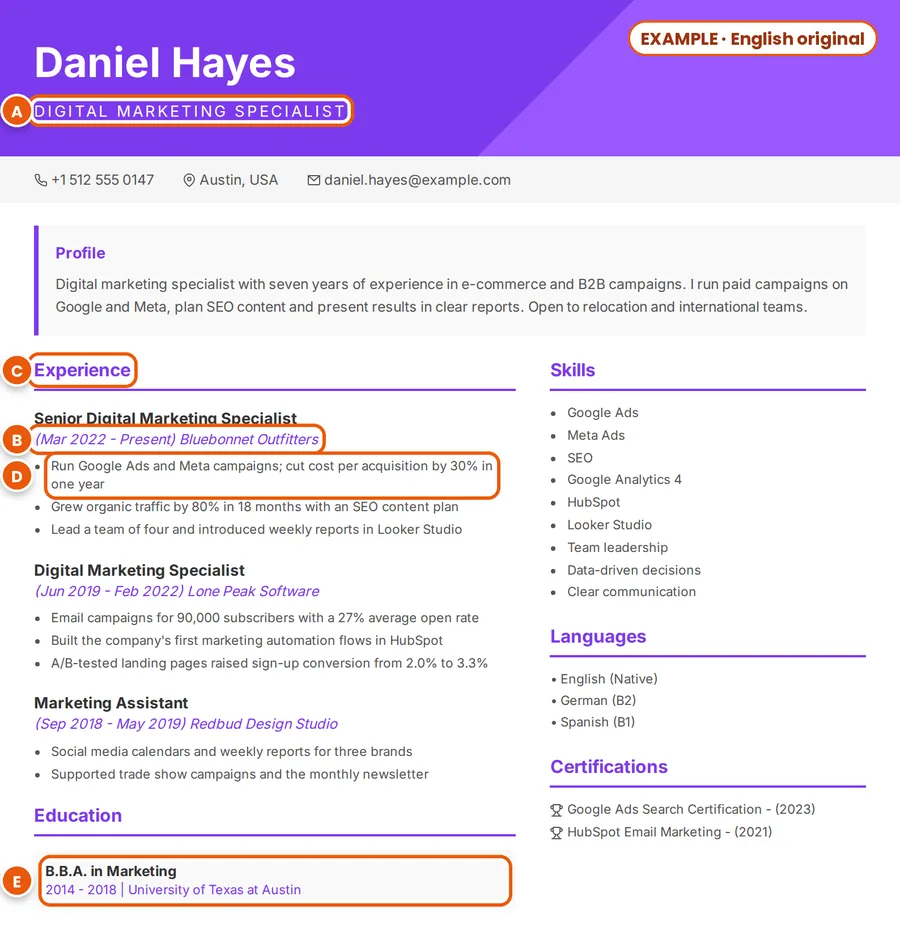
OriginalExample: fictional English CV of Daniel Hayes, with the job title, dates, a heading, a results line and the degree marked A to E
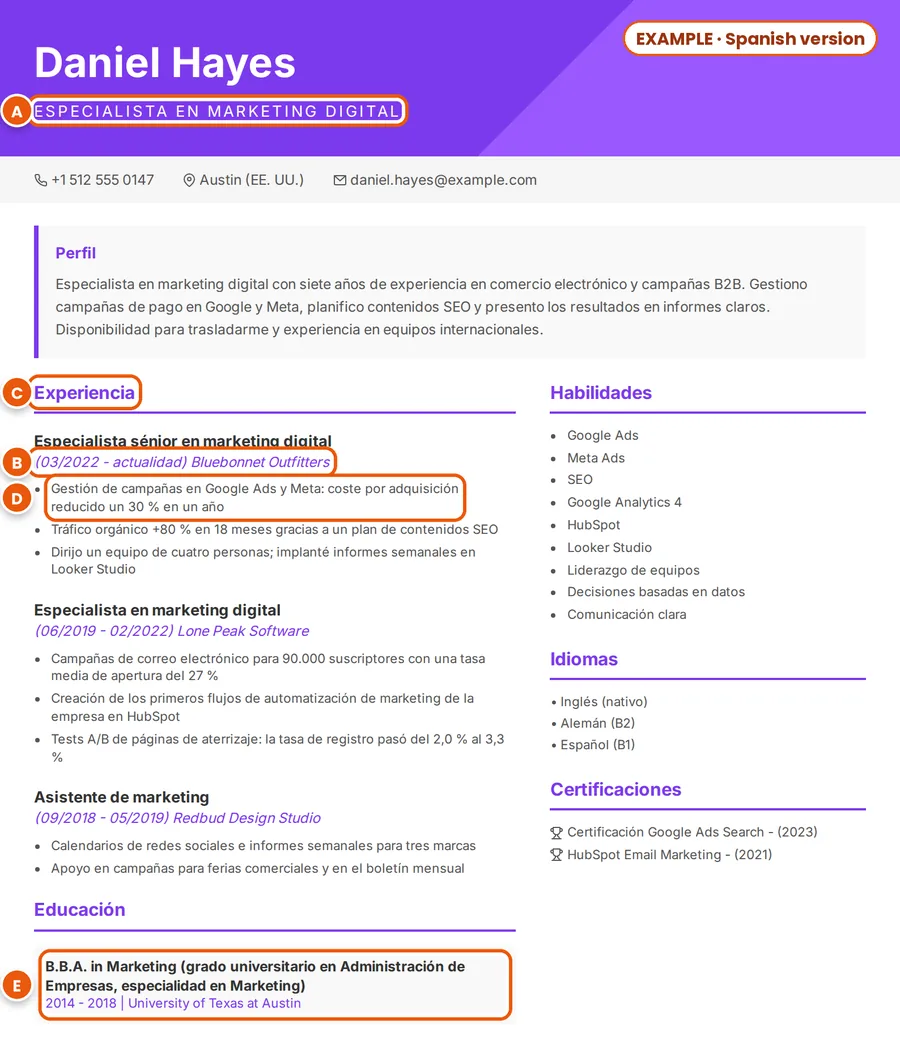
TranslatedExample: the same CV in Spanish from Spain, with the translated job title, dates, heading, results line and degree marked A to E
Example with a fictional CV: the English original (left) and a Spanish version (right).
MarkEnglish CVSpanish CVWhy
ADigital Marketing SpecialistEspecialista en Marketing DigitalThe adjective moves after the noun. In the body of the CV Spanish uses fewer capitals: “Especialista sénior en marketing digital”.
BMar 2022 – Present03/2022 – actualidadMM/AAAA (año = year), as the notes asked. With month names, Spanish writes them in lower case: “marzo de 2022”, or “mar. 2022” for short.
CExperience, Skills, EducationExperiencia, Habilidades, EducaciónThe headings of MyEasyCV’s Spanish designs. On Spanish CVs you’ll also see “Experiencia laboral”, “Formación académica” and “Competencias”. If you prefer those, retype the heading in the editor.
Dcost per acquisition … reportscoste por adquisición … informesSpanish from Spain, as the notes asked. Latin American Spanish would usually say “costo” and “reportes”.
EB.B.A. in MarketingB.B.A. in Marketing (grado universitario en Administración de Empresas, especialidad en Marketing)The original degree name is kept and explained in Spanish. “University of Texas at Austin” stays as it is.

Spain or Latin America? Tell the AI in your notes

Spanish is a single option in the language list, so the variety comes from your notes. A few words that differ:

Notes for Spain
“Use Spanish from Spain.”
Notes for Latin America
“Use neutral Latin American Spanish.” Or name the country: “Use Mexican Spanish.”
cost · reports
Spain: coste · informes · Latin America: costo · reportes
computer · mobile phone
Spain: ordenador · móvil · Latin America: computadora · celular

Going the other way? See Spanish CV to English.

What to check after the translation

MyEasyCV is set up to keep every job, bullet point and date. Still, read the whole CV before you send it. Check these in particular:

  • Facts and numbers. Employers, dates, figures and percentages match your original.
  • Job titles. They read like real job ads in the target country. A quick search on a local job board helps.
  • Degrees and grades. The degree is explained, the institution’s name is correct, and any grade shows its scale.
  • Personal details. Translation keeps what your CV contains. Delete what the target country doesn’t expect (often the date of birth, nationality, marital status, ID or tax numbers and a photo) in the editor.
  • Consistency. One spelling variety and one date style throughout: British or American, Spain or Latin America.
  • Contact details. Phone numbers with the country code, e-mail and LinkedIn unchanged.
  • Length. PDF view shows how many pages you have.
  • A final read-through. Read it aloud once, or ask a native speaker to look at it.

How to write good notes

Notes work best when they are short and specific: one instruction per line, saying exactly what you want. They are instructions to the AI, not settings, so check the result in the preview.

Name the variety

“Use British English”, “Use American English”, “Use Spanish from Spain”, “Use neutral Latin American Spanish”, “Use European Portuguese”, “Use Brazilian Portuguese”.

Name the format

“Write dates like Mar 2022”, or “Write dates as MM/YYYY”.

Explain grades, don’t convert them

“Keep my grade 1.7 and add: German scale, 1.0 is the best.” If an employer needs an official equivalent, use a recognised service such as UK ENIC (UK) or WES (US and Canada).

Ask for a gloss when you want one

Company, university and school names stay as written by default. To show an English name as well, ask for it: “Add the English name of my university in brackets.”

Fix a term

“Translate Werkstudentin as working student”, “Keep the term Licenciatura in brackets”.

Add what’s missing

“Add: since June 2025 I also lead the SEO team.” Notes can add information your file doesn’t have.

Common requests and what to expect

NoteWhat happens
“Keep company names in German”Already the default: names of companies, universities and schools aren’t translated. Writing it doesn’t hurt.
“Don’t translate the university name”Also the default. Add “… and put the English name in brackets” if you want both.
“Use UK spelling”A good, specific note: organise, specialising, CV.
“Convert my grades to the UK system”Possible to ask, but a converted grade is only an estimate and can mislead. Safer: keep the original grade with its scale.
“Remove my date of birth”The translator is set up to keep everything your CV contains, so deleting details is more reliable in the editor after the CV is created.
“Make it better”Too vague. Say what you want: “Use a formal tone”, “Start each bullet point with a verb”.

Frequently asked questions

How many languages can I translate my CV into?

More than 50: the CV Language list currently has 79, including English, Spanish, German, French, Portuguese, Arabic, Turkish and Japanese. Spanish and Portuguese are single options, so use the notes to ask for Spain or Latin America, European or Brazilian Portuguese.

Is it free to translate my CV?

Creating your first CV and seeing the full result is free with an account, and no card is needed. You can edit it as much as you like and download a free PDF with a watermark. The clean PDF without the watermark needs the One-Time package or the Pro plan. Prices depend on your country and are shown on the pricing page.

Which files can I upload?

PDF, DOC, DOCX or TXT, up to 5 pages. Image files such as JPG or PNG aren’t accepted. If your CV only exists on paper, type it into a document first.

What can I write in Additional Notes?

Instructions for the translation: the spelling variety (British or American English, Spain or Latin America), the date style, terms to keep or explain, and details to add. The notes are sent to the AI with your CV. Keep them short and specific, and check the result in the preview.

Will my company and university names be translated?

No. Names of people, companies, universities and schools stay as written, as do e-mail addresses, phone numbers, links, software names and certification acronyms. If you want an English name next to the original, ask for it in the notes.

Why is my CV still in the original language?

The CV Language field was probably set to “Same language as my CV”. That option keeps the CV in its original language, rebuilt in the design you chose, without translating it. To get a translation, choose the language you need in CV Language and create the CV again. Every new CV uses one CV generation, and a free account includes one.

Can I translate a CV I already made with MyEasyCV?

Yes. In the upload step, click “My CVs” to pick a CV saved in your account instead of uploading a file, then choose the new language. This creates a new CV, so it uses one CV generation.

Can I change the translation afterwards?

Yes. In the editor you can change any line yourself, including section headings, as often as you like. With AI edits you describe a change and the AI makes it; a free account includes 3. Your CV stays in the dashboard, so you can come back to it later.

Will the translated CV work with applicant tracking systems (ATS)?

All 25 MyEasyCV designs use standard section headings and real text that ATS software can read. For the strictest systems, choose one of the 11 single-column designs.

Is this a certified translation?

No. MyEasyCV writes your CV in the new language for job applications. Diplomas and documents for authorities need a certified translator.

Ready to translate your CV?

Upload the CV you have, add your notes and choose the language. Your first CV is free to create and preview.

Open the CV translator

Welcome Back 👋

Sign in to access your account

Continue with Google
Or
Forgot Password?

Protected by reCAPTCHA

Don't have an account? Sign Up

Reset Password 🔐

Enter your email and we'll send you a reset link

Remember your password? Sign In

Create Account 🚀

Join thousands of professionals

Sign up with Google
Or

Protected by reCAPTCHA

By signing up, you agree to our Terms of Service and Privacy Policy

Already have an account? Sign In

Enter Verification Code 📧

Check spam folder if not received

Resend Code  •  Sign Up

✓

Welcome Back

Sign in to access your account

Welcome Back 👋
redirecting

💬 Support

Having a problem? Write to us — we’re happy to help.